Why a 100% complete profile matters
Your Marketing Profile is your digital storefront on Insurance Storefronts. It’s how high-intent prospects find you, learn about your expertise, and decide to reach out. A complete profile isn't just a nice-to-have; it's a powerful tool that works for you 24/7.
When your profile is 100% complete, you unlock several key advantages:
- More Client Matches: Our system uses the information in your profile to accurately match you with prospects looking for your specific services in your service areas. The more complete your profile, the better and more frequent these matches become.
- Higher Search Ranking: A fully optimized profile is more likely to rank higher in search results on our platform and be eligible for indexing by Google. This means more visibility for your business.
- Stronger Trust and Credibility: A detailed, professional profile builds immediate trust with potential clients. They see your expertise, your carriers, your reviews, and feel confident reaching out.
- Website Builder Access: Reaching at least 80% completeness in your Marketing Profile unlocks our "Start your website" builder, allowing you to create a professional online presence.
Think of your profile as your most important online employee, tirelessly generating leads and building your brand. Let’s make sure it’s working at its full potential.
Your completeness tracker
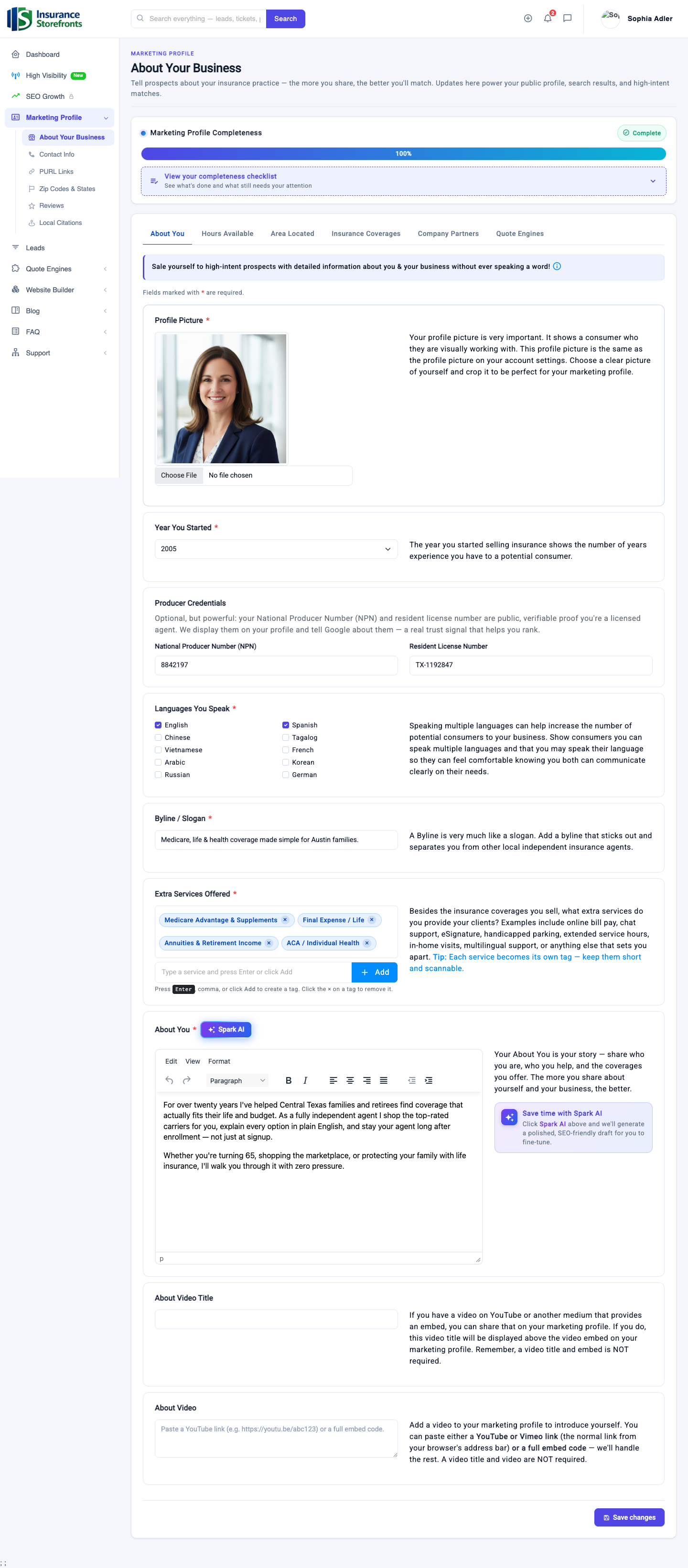
You can find your Marketing Profile editor in your agent dashboard under "Marketing Profile." At the top of the editor, you'll see a "Marketing Profile Completeness" tracker. This tracker shows your live percentage and has an expandable checklist that details exactly what you’ve completed and what still needs your attention. It’s your roadmap to 100%.
Your completeness score is calculated across five main sections, each contributing an equal share. To hit 100%, you need to complete every item within these sections.
Section 1: About Your Business
This section is all about showcasing who you are and what you offer. It's divided into several sub-tabs: "About You", "Hours Available", "Area Located", "Insurance Coverages", and "Company Partners."
- Profile Photo: Upload a clear, professional headshot of yourself. This is often the first thing prospects see and helps them connect with you. You can easily upload and crop your photo directly in the editor.
- About You Bio: Write a compelling biography that highlights your experience, philosophy, and what makes you unique. Don't worry about starting from scratch – use the Spark AI button to generate a polished, SEO-friendly first draft that you can then fine-tune to reflect your voice.
- Byline/Slogan: Add a short, memorable byline or slogan that captures your brand essence.
- Year Started Selling Insurance: Select the year you began your career. This instantly communicates your experience and longevity in the industry.
- City, State & ZIP Code: Provide your primary business location. This helps local prospects find you.
- National Producer Number (NPN) & Resident License Number: While optional, adding these verifiable trust signals enhances your credibility and we pass this information to Google, further boosting your profile.
- Specialties: Clearly list your areas of expertise. What types of clients or situations do you excel at serving?
- Extra Services: Use these tags to highlight any additional services you offer beyond core insurance, such as financial planning or risk management.
- Languages Spoken: If you speak multiple languages, list them. This can significantly broaden your reach to diverse client bases.
- Office Hours: On the "Hours Available" sub-tab, set your regular office hours. This helps prospects know when you're available.
- Insurance Services/Coverages: On the "Insurance Coverages" sub-tab, select all the types of insurance you sell (e.g., Auto, Home, Life & Annuities, Business, Medicare). Be comprehensive!
- Carriers You Represent: On the "Company Partners" sub-tab, list all the insurance carriers you work with. You can add them individually using our autocomplete feature or import them efficiently via a CSV file.
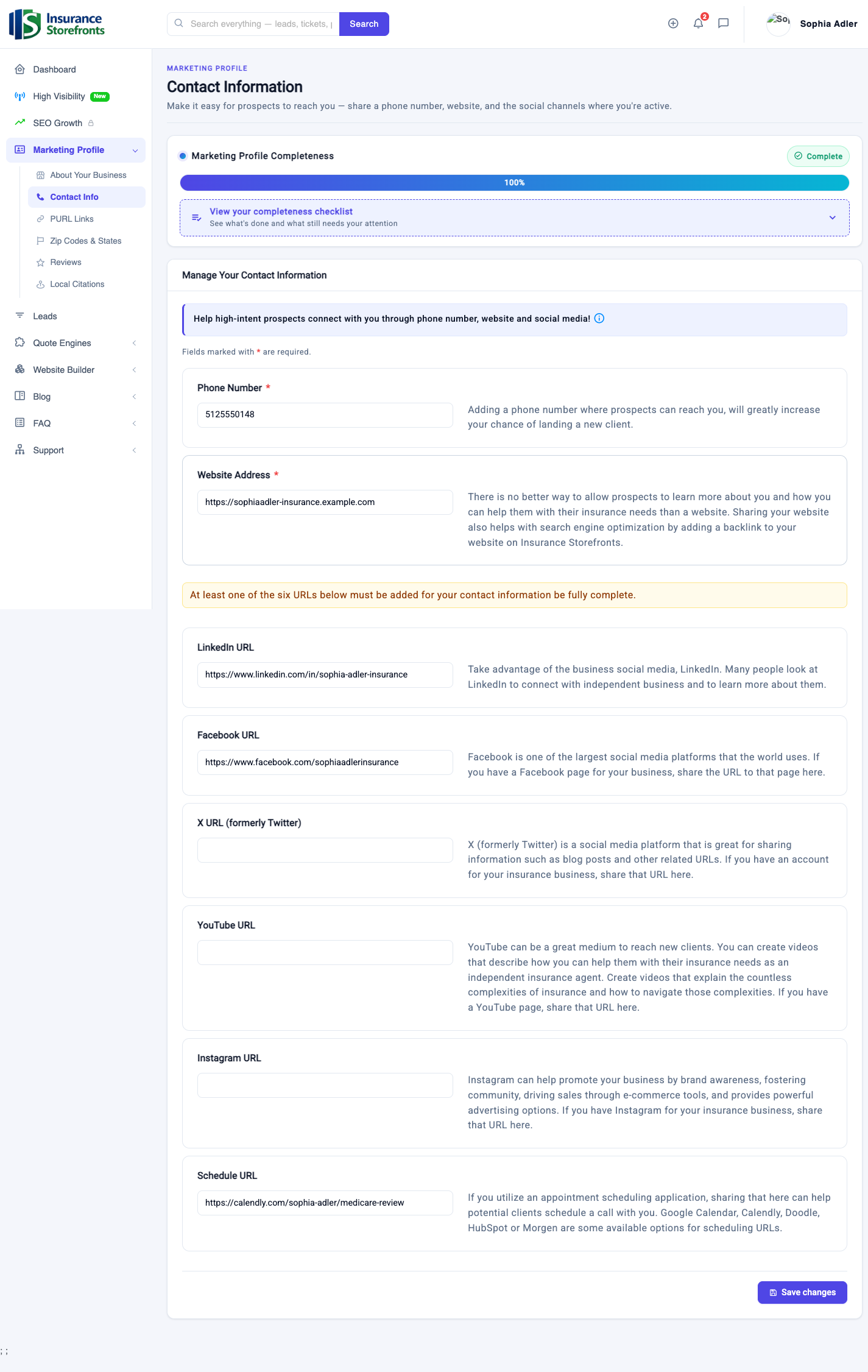
Section 2: Contact Info
Make it easy for prospects to get in touch with you.
- Phone Number: Provide a direct phone number where prospects can reach you.
- Website Address: If you have an existing website, link it here. Even better, once your profile is 80% complete, you can build a new site using our integrated website builder.
- Social or Scheduling Link: Add at least one link from your LinkedIn, Facebook, X (formerly Twitter), YouTube, Instagram, or a scheduling link (like Calendly). A scheduling link is particularly effective as it allows prospects to book a consultation or meeting with you directly, streamlining the initial contact process.
Section 3: Zip Codes & States
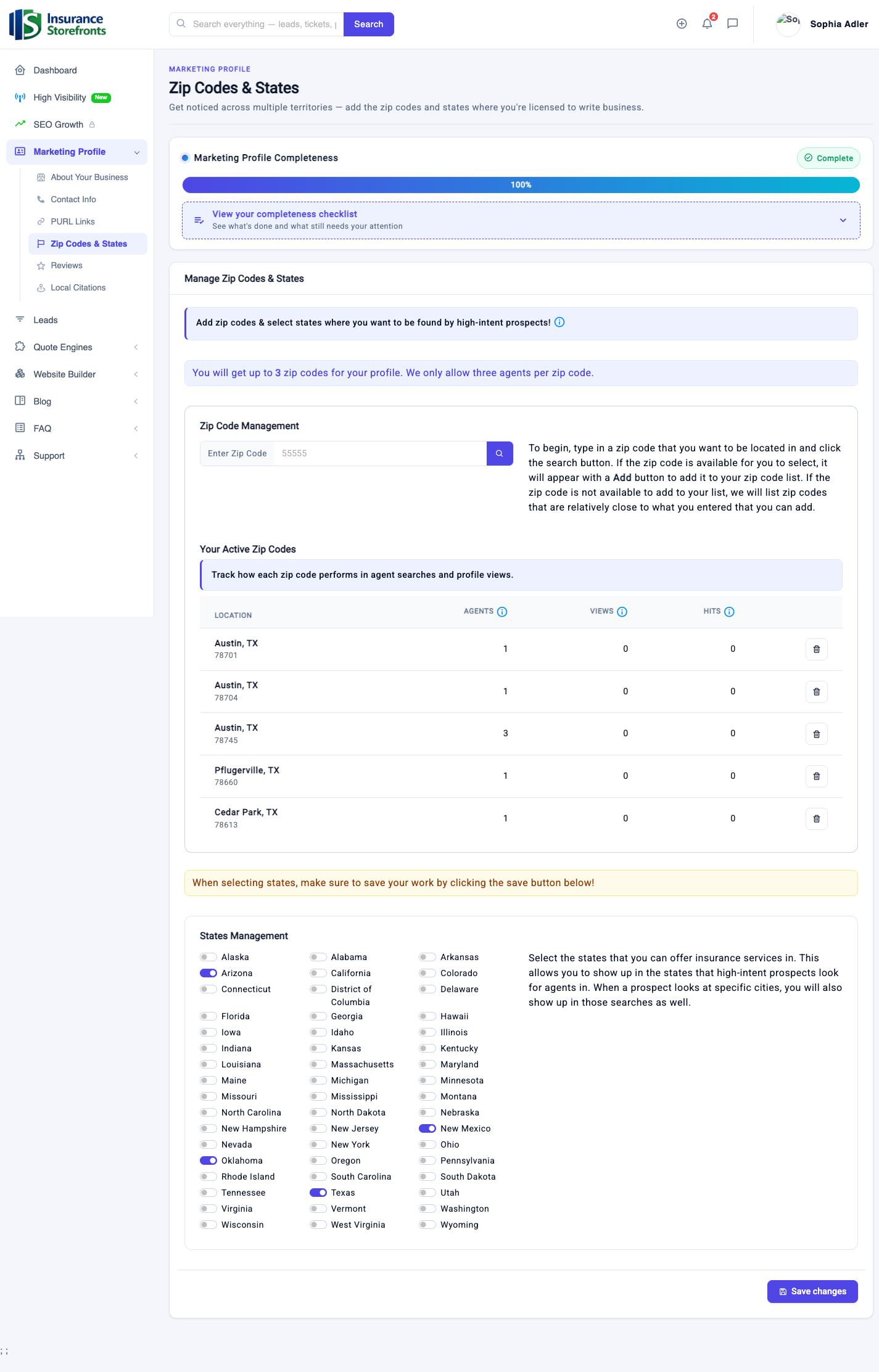
This is crucial for local search and client matching.
- Service ZIP Codes: Add the specific local ZIP codes where you want to be found by high-intent prospects. Our system uses these ZIP codes to match you with clients in your immediate service areas. Add them one at a time.
- Licensed States: Select all the states where you are licensed to sell insurance. This ensures you are matched with prospects in areas where you are legally able to serve them.
Section 4: Helpful Links (PURLs)
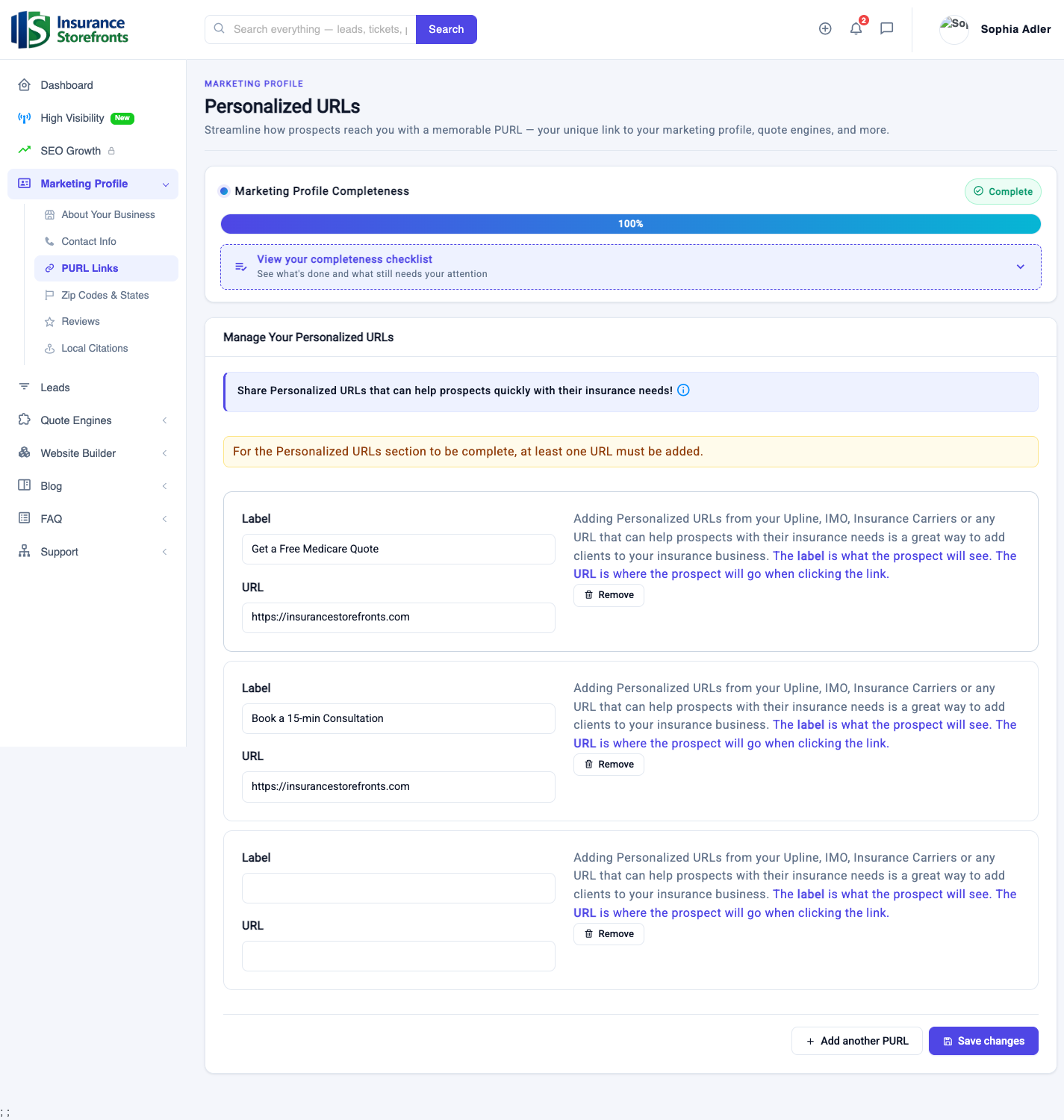
Helpful Links, or PURLs (Personalized URLs), are calls-to-action that appear on your public profile, guiding prospects toward the next step.
- At least one helpful link: Add at least one personalized link. These links consist of a custom label and a URL. Examples include "Get a Free Quote," "Book a Consultation," or a direct link to a specific quote engine on your website. These links are designed to push prospects toward taking action.
Section 5: Reviews
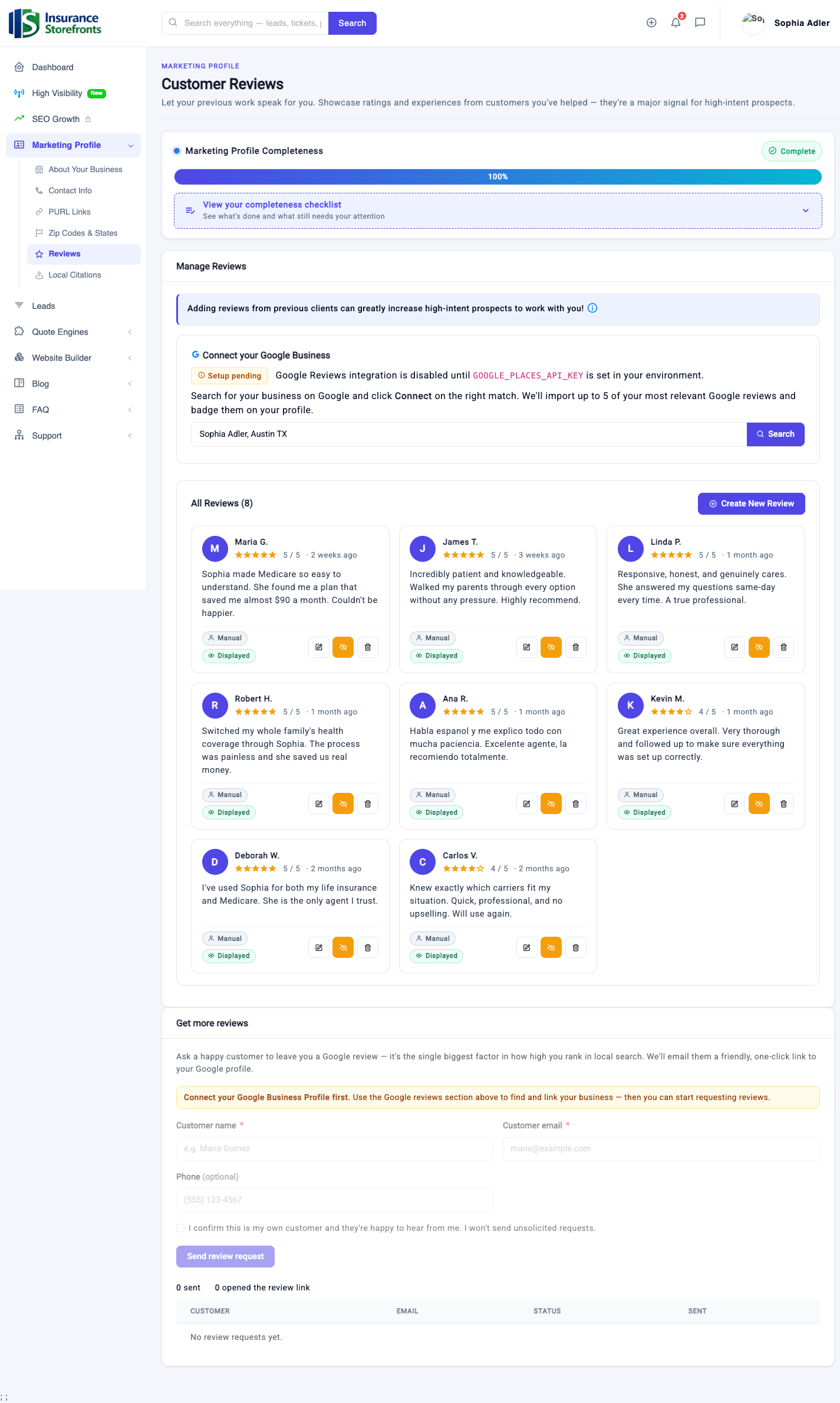
Social proof is incredibly powerful in building trust.
- At least one approved review OR a connected Google Business profile: You can either manually add and approve reviews from satisfied clients, or, for an even stronger trust signal, connect your Google Business Profile. Connecting your Google Business Profile will automatically pull in and display your real Google reviews and your aggregated star rating directly on your profile, providing high-intent prospects with authentic feedback from your clients.
Your 100% checklist
Ready to hit 100%? Use this quick checklist to confirm you've completed every item:
- Section 1: About Your Business
- Profile photo uploaded
- About You bio completed (use Spark AI!)
- Byline/Slogan added
- Year started selling insurance selected
- City, state, and ZIP code entered
- NPN and Resident License Number (optional, but recommended)
- Specialties listed
- Extra services tagged
- Languages spoken listed
- Office hours set
- All insurance coverages you sell selected
- All carriers you represent added
- Section 2: Contact Info
- Phone number provided
- Website address added
- At least one social or scheduling link added
- Section 3: Zip Codes & States
- All service ZIP codes added
- All licensed states selected
- Section 4: Helpful Links (PURLs)
- At least one helpful link (label + URL) added
- Section 5: Reviews
- At least one approved review OR Google Business Profile connected
Take a few moments to review your Marketing Profile and complete any remaining items. A 100% complete profile is your strongest asset for attracting high-intent clients and growing your independent insurance business.
Ready to put these ideas to work?
Insurance Storefronts gives you the marketing profile, quote engines, AI website, and SEO tools to attract local prospects on autopilot.