Every lead, in one place
As an independent agent, your leads come from many different places: your website, your marketing efforts, referrals, and more. Keeping track of them all can be a challenge. That's why your Insurance Storefronts account includes a powerful Lead Management workspace — your Lead Pipeline — designed to bring every prospect into a single, organized place.
No matter where a lead originates, it's captured here. This means you'll find prospects from these five sources:
- Marketing Profile: Leads matched to you through your Insurance Storefronts Marketing Profile.
- Quote Engines: Individuals who have run a quote directly on your profile or website.
- Website Forms: Submissions from contact forms on your Insurance Storefronts website.
- Manually: Leads you add yourself, one by one.
- Import: Prospects you've brought in through a bulk import.
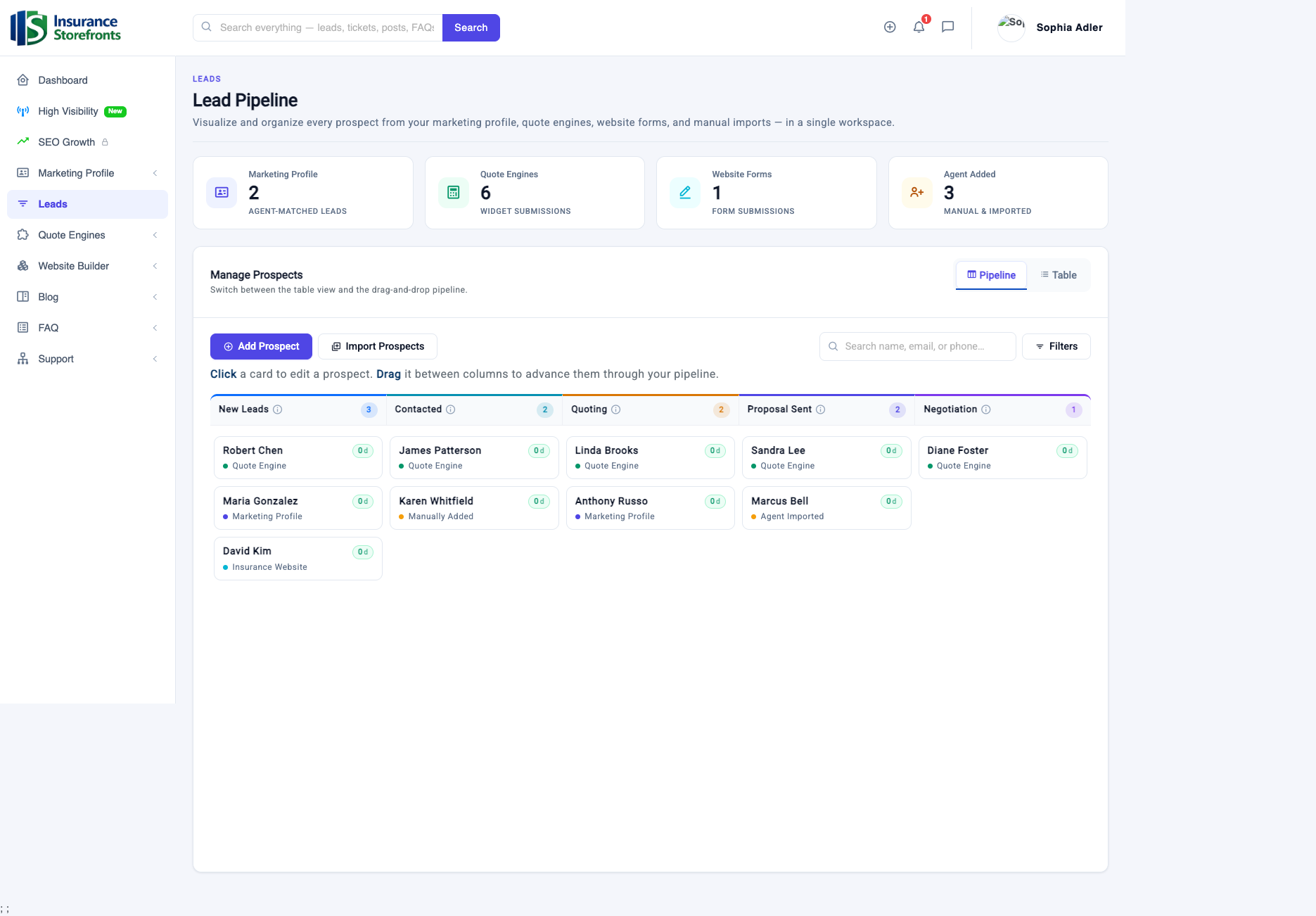
At the top of your Lead Pipeline, a series of cards gives you an instant overview, showing you exactly how many leads each source has generated. This helps you quickly see which channels are producing the most interest for your business.
See your whole pipeline at a glance
The core of your Lead Pipeline is a visual, drag-and-drop board — a Kanban-style view that makes managing your prospects intuitive and efficient. This board is organized into columns, each representing a stage in your sales process:
- New Leads: Prospects who have just arrived and haven't been contacted yet.
- Contacted: Leads you've reached out to.
- Quoting: Prospects for whom you are preparing a quote.
- Proposal Sent: Leads who have received your quote or proposal.
- Negotiation: Prospects with whom you are discussing terms or pricing.
As you work with a lead, you simply drag its card from one column to the next. This visual progression ensures you always know the exact status of every prospect in your pipeline. When a deal successfully closes, you move the lead to Prospect Won. If it doesn't work out, you move it to Prospect Lost. This keeps your active board focused on the prospects you can still earn, helping you manage your time and attention effectively.
Work — and win — each lead
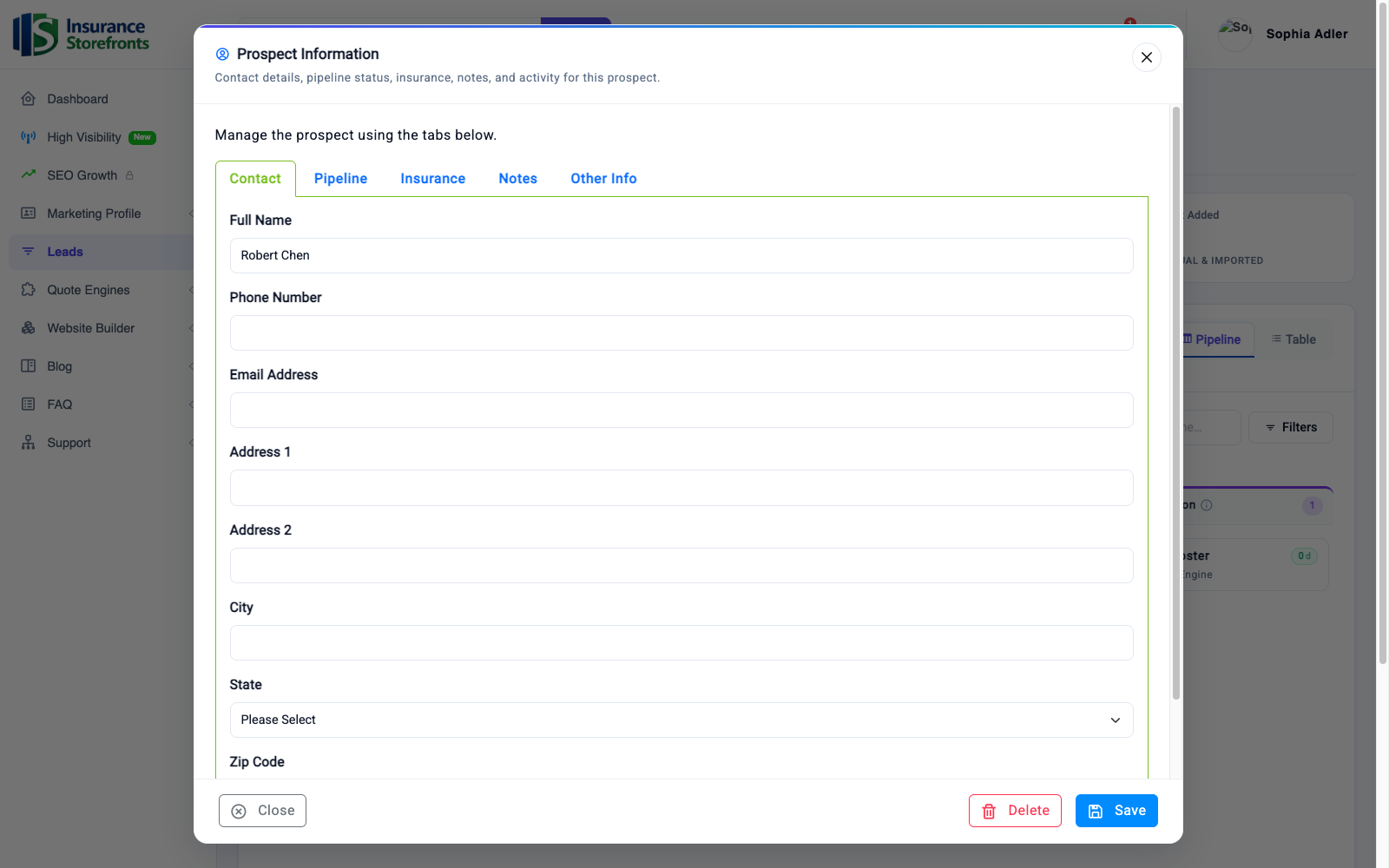
To dive deeper into any lead, simply click its card on the pipeline board. This opens the Prospect Information panel, your central hub for managing every detail related to that prospect. Within this panel, you'll find several tabs that keep all the relevant information organized:
- Contact: Essential details like name, phone number, email, and address.
- Pipeline: Shows the current stage the lead is in — you can also update it here.
- Insurance: Details about the specific coverage or type of insurance they are interested in.
- Notes: This is where you log every call, email, and follow-up. This ensures you never forget a conversation detail or a promised action.
- Other Info: Any additional relevant information you need to track.
You can update any of these details and save your changes, or even remove a lead if necessary. Because the lead's source, all its contact details, its entire history, and your notes are all stored together, you can pick up any conversation right where you left off, making every interaction personal and informed.
Two views: pipeline and table
Your Lead Management workspace offers flexibility in how you view and interact with your prospects. You can switch between two powerful views:
- Pipeline View: This is the drag-and-drop board described above, ideal for a visual overview and quickly moving leads through stages.
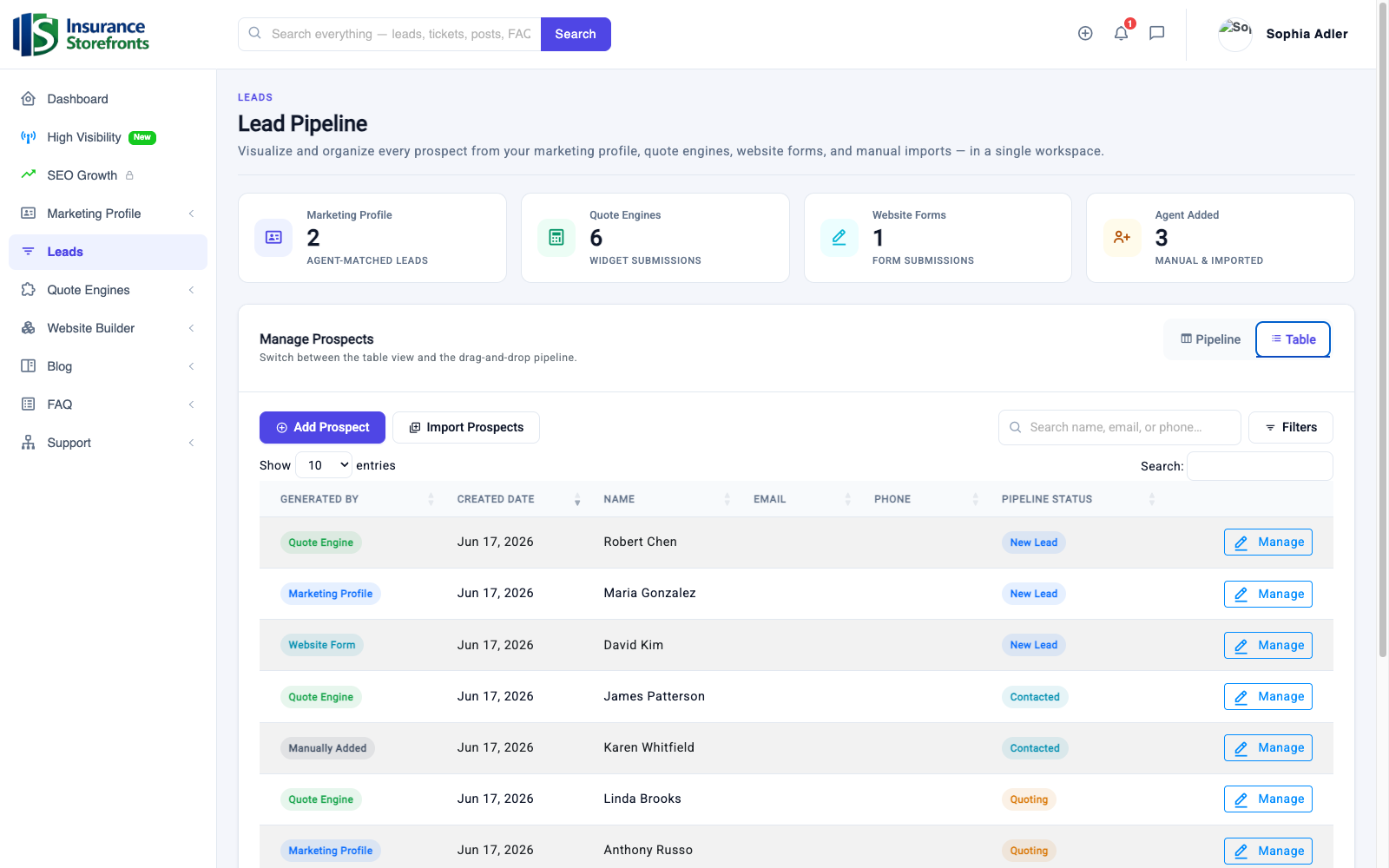
- Table View: This presents your leads as a sortable, searchable list. Each row shows key information such as the lead's source ("Generated By"), the date it arrived, name, email, phone number, and its current pipeline status. Every row also includes a "Manage" button, giving you quick access to the Prospect Information panel.
The Table View is perfect for when you need to quickly find a specific lead or focus on a particular segment. Use the Search function to locate a prospect by name or other details, or apply Filters to narrow down your list by pipeline stage or lead source. From here, you can also easily Add Prospect (manually, one at a time) or Import Prospects (in bulk) directly into your pipeline.
How it helps you win more clients
The Lead Management workspace isn't just about organizing — it's about helping you convert more prospects into clients, making your daily work easier, and ultimately benefiting your business. Here's how:
- Nothing slips through the cracks: Every single lead from every channel is captured in one central place. No more scattered prospects across emails, voicemails, sticky notes, or forgotten spreadsheets. You have a complete, unified record.
- Speed to the lead: You see new leads the moment they arrive. Responding quickly is often the single biggest factor in turning a quote request into a client. Your pipeline helps you act fast.
- Always know the next step: The visual pipeline clearly shows exactly which stage each prospect is in. This means you know when to follow up, what to discuss, and how to keep more leads moving consistently toward a "Won" status.
- Never forget a conversation: Your notes and history travel with each lead. Every follow-up feels personal, informed, and professional because you have all previous interactions at your fingertips.
- Focus your effort: The source cards at the top show you precisely which channels are producing — and converting — leads. This insight allows you to double down on what works best for your business and optimize your marketing spend.
- Less admin, more selling: One organized workspace replaces the busywork of tracking leads by hand. This frees up your valuable time from administrative tasks, allowing you to focus on the conversations that close deals and grow your book of business.
Get the most out of your pipeline
To truly maximize the benefits of your Lead Pipeline and turn more prospects into clients, adopt these simple habits:
- Check your pipeline daily: Make it a routine to review your New Leads and other active stages.
- Respond to New Leads fast: The quicker you connect, the higher your chances of winning the business.
- Move each lead to its real stage as you work it: Keep your pipeline accurate — it's your guide.
- Log a note after every call or interaction: Even a quick summary helps you remember details and build rapport.
- Mark deals Won or Lost promptly: This keeps your active board clean and focused on opportunities you can still earn.
- Import your existing contacts: Bring all your current prospects and past leads into one place so everything lives together.
By consistently using your Lead Management workspace, you'll gain clarity, improve efficiency, and develop a more systematic approach to growing your client base. This powerful tool is designed to help you streamline your sales process and turn more of your leads into loyal clients.
Ready to put these ideas to work?
Insurance Storefronts gives you the marketing profile, quote engines, AI website, and SEO tools to attract local prospects on autopilot.